
M365 Copilot Can Now Transcribe In Person and Hybrid Meetings!


I recently delivered a M365 Copilot course for a business who really needed in person meeting notes and transcription. They were looking at Otter AI and Fireflies as possible tools to help them with this but this would have meant an increased cost of around £10 per user per month. They were also very strict in terms of what they could use for data security and GDPR reasons.
However Microsoft has quietly introduced a way to record and transcribe in-person meetings using M365 Copilot Facilitator on your phone — and it’s flown completely under the radar for most Microsoft 365 users.
Considering how many businesses are paying for separate note-taking tools, that’s quite surprising and they should really be shouting about this more. Not only can it transcribe in person meetings but it appears capable of working with hybrid meetings too.
So what’s actually new?
Until recently M365 Copilot would only work for online teams meetings. This was a problem for many companies who work in the real world and forced them to look at additional tools for their business. But now you can open teams on your phone, start a new meeting and get the full transcript afterwards.
Once you’ve got a full transcript of a meeting, everything else becomes much easier. You can use the transcript in your workflow to write up follow ups, generate proposals and refer back to the transcript a bit like a database about the meeting whenever you want.
How to try M365 Copilot for In Person Meetings:
This is the only part that feels slightly “hidden”, which probably explains why so few people are using it. Here’s how to access it:
Download Microsoft Teams on your phone
Go to the Calendar
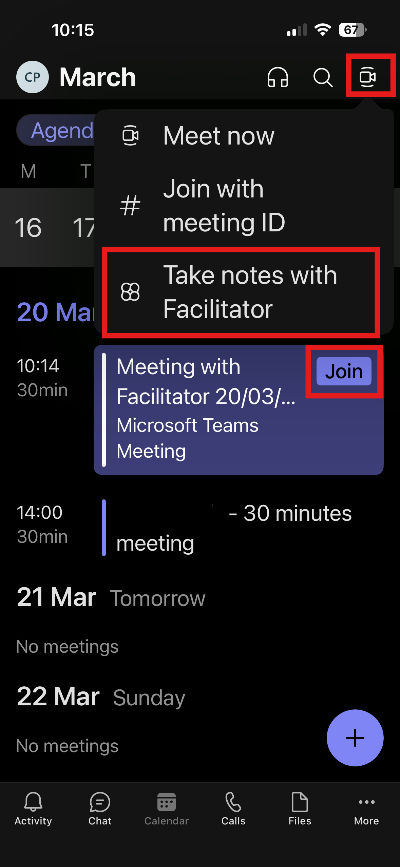
Tap the small icon in the top right (it looks like a camera with lines around it)
Press “Take Notes with Facilitator”
Allow microphone access
Start your meeting
Once you’ve done that, everything is recorded, transcribed, and saved into Teams with a recap available afterwards. See the screen shot below:
Top tips: After start the meeting just be aware that the first few sentences may not be recorded so you may want to wait 30 seconds or so before beginning the meeting. Once you do start also get each person to state their name so that you can update this in the transcript and notes later on.
People need to know this exists!
This feels like a classic case of Microsoft building something genuinely useful and then not making enough noise about it. The ability to capture and reuse in-person conversations is a big step forward. It is not as flashy as some of the the new Claude features at present but it is incredibly practical and useful for businesses that really need this functionality and are tied to M365 Copilot for security and cost reasons! For many teams that’s exactly the kind of improvement that makes the biggest difference over time.
If you or your team need training in M365 Copilot please reach out today to see how they can become super effective with the tools they already have! Alternatively find out more about any of our AI Training courses here.


Comments